- Reads
- CSV, JSON, Parquet, Feather, Excel, SQL
- Python
- 3.10 to 3.14
- Default rules
- 20
- Tests
- 747 at 99%
- Licence
- Apache 2.0
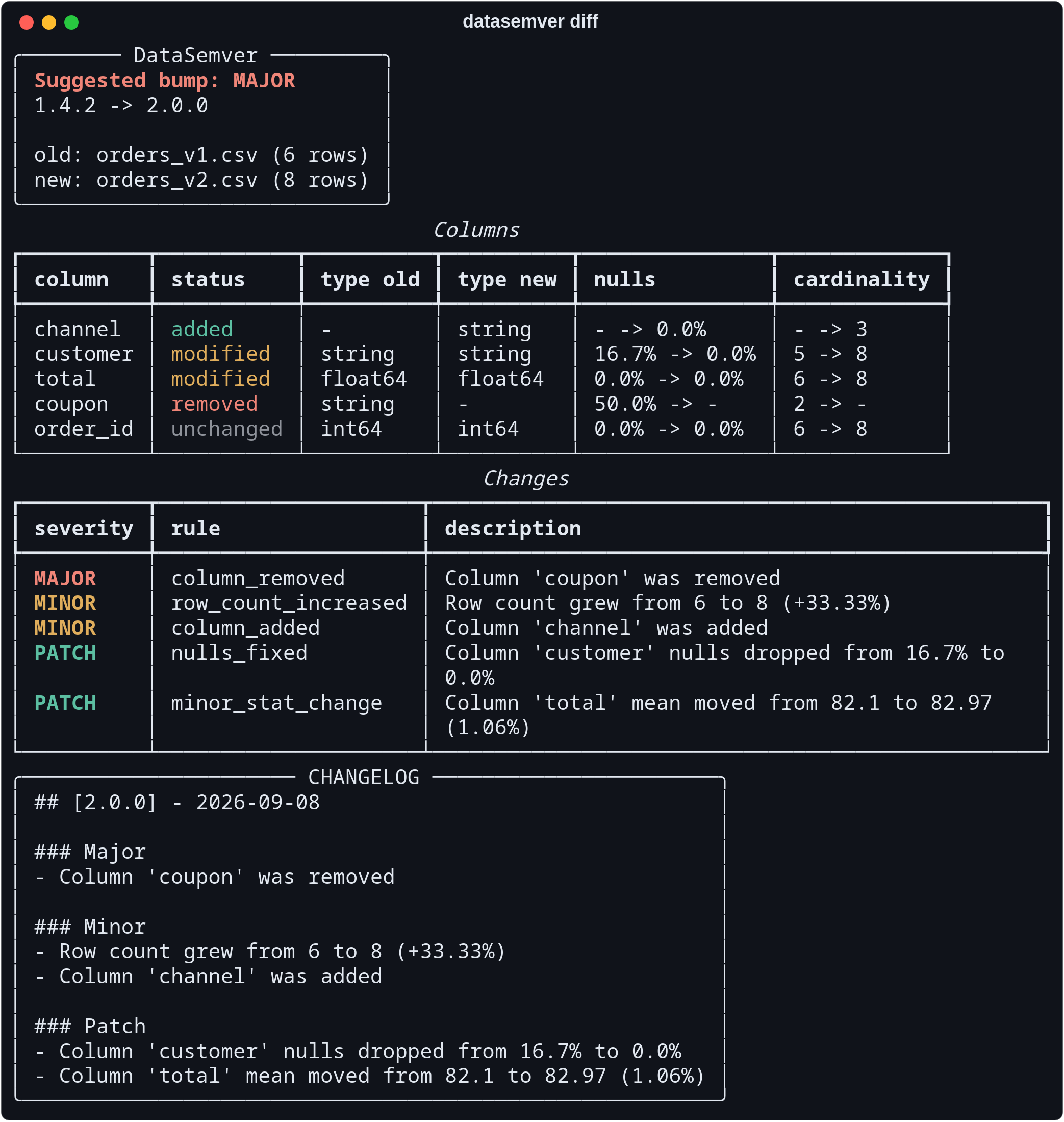
Code has SemVer. Data does not.
A dropped column, a phone number that turned into a string, a distribution that quietly
shifted. All of them break the people downstream. All of them usually ship as "updated
the dataset".
DataSemver makes that impact explicit and reviewable, so releasing a dataset can be
discussed the way releasing a library is.
How it decides
Every difference is matched against a rule, and every rule carries a severity. The
strongest severity found becomes the bump, which is why the order below is the whole
argument rather than a way to group three cards.
major1.4.2 → 2.0.0
Existing queries can break
Something consumers already depend on is gone, or means something else now.
- column_removed
- type_changed_incompatible
- column_renamed
- distribution_shift
- psi_greater_than
minor1.4.2 → 1.5.0
New information, contracts hold
There is more than there was, and nothing that was there has moved.
- column_added
- row_count_increased
- new_category_added
- cardinality_changed
- category_balance_shift
- rows_modified
patch1.4.2 → 1.4.3
Same meaning, better data
The dataset says what it said before, with fewer gaps or less noise.
- nulls_fixed
- minor_stat_change
- type_changed_compatible
Severity belongs to your rules file, not to the change itself. The bundled defaults are
one opinion; strict and lenient profiles
ship beside them, and the
rule catalogue
lists every rule, metric and threshold. Anything no rule covers is reported as
unclassified and never inflates the result.
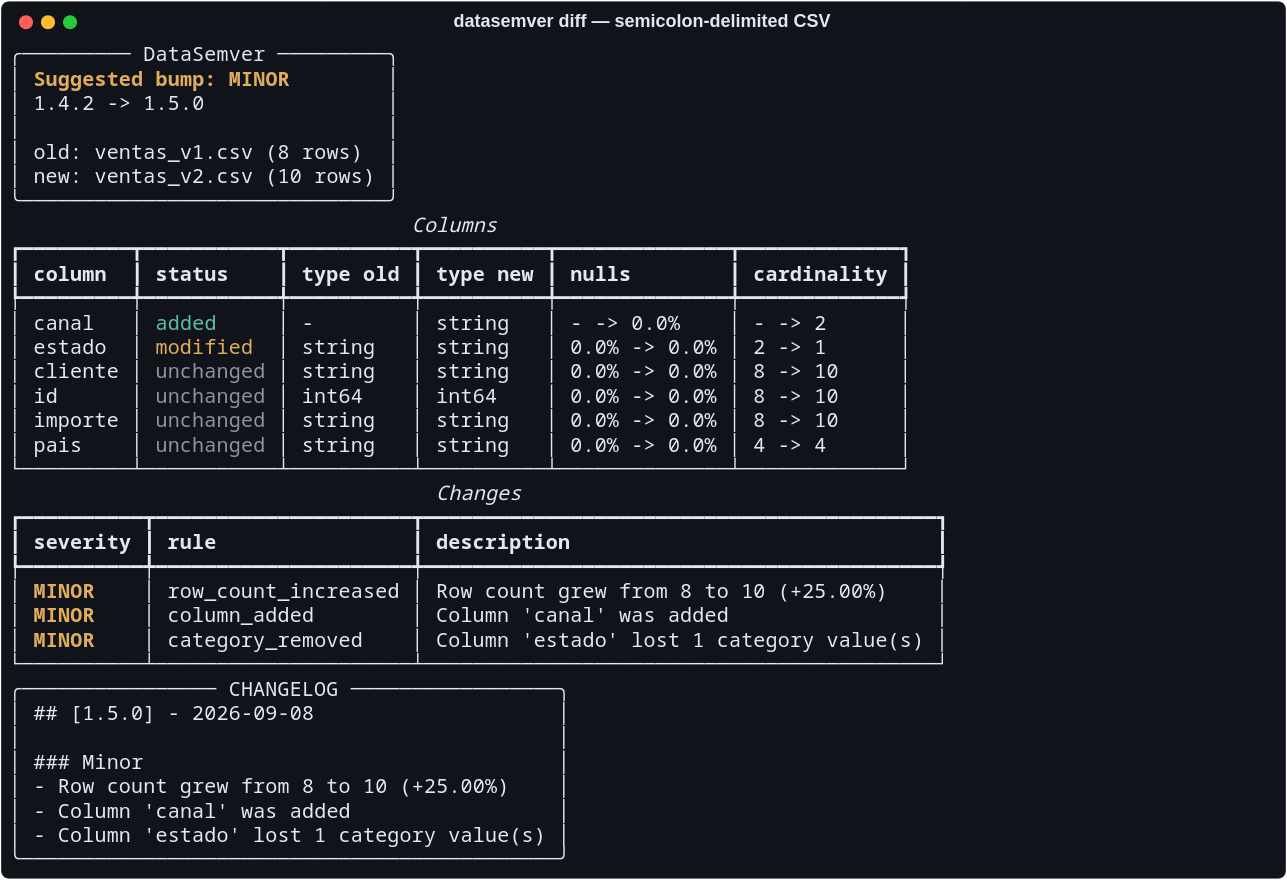
Delimiters are detected, not assumed
This export separates its fields with semicolons while every amount also contains a
comma. The comma never reaches the header, so the semicolon wins and the file loads
as five columns instead of one.
Comma, semicolon, tab and pipe are recognised. Set
DATASEMVER_CSV_DELIMITER to skip the detection entirely.
What it reads
One command whatever the dataset arrived as, because the format is rarely the thing
being compared. A stored profile counts as a dataset on either side, so a comparison can
run with the previous version long gone.
Text
CSV and TSV, gzipped or not, with the delimiter detected. JSON as an array of objects, and JSON Lines.
.csv .tsv .csv.gz .tsv.gz .json .jsonl .ndjson
Arrow on disk
Parquet and Feather state the type of every column, so nothing is inferred: a postcode stays a string instead of becoming an integer with the leading zero gone.
.parquet .pq .feather .arrow
Workbooks
A sheet after #, or the first one when none is named. Needs the excel extra.
quarterly.xlsx#Q3
Database tables
A connection URL with the table after #. The password never reaches the report, the logs or a file name.
sqlite:///snapshots.db#customers
The same analysis in a browser
The dashboard is a client of the library rather than a fork of it. It calls the same
function and renders the same report, so the two agree by construction.
127.0.0.1:8000
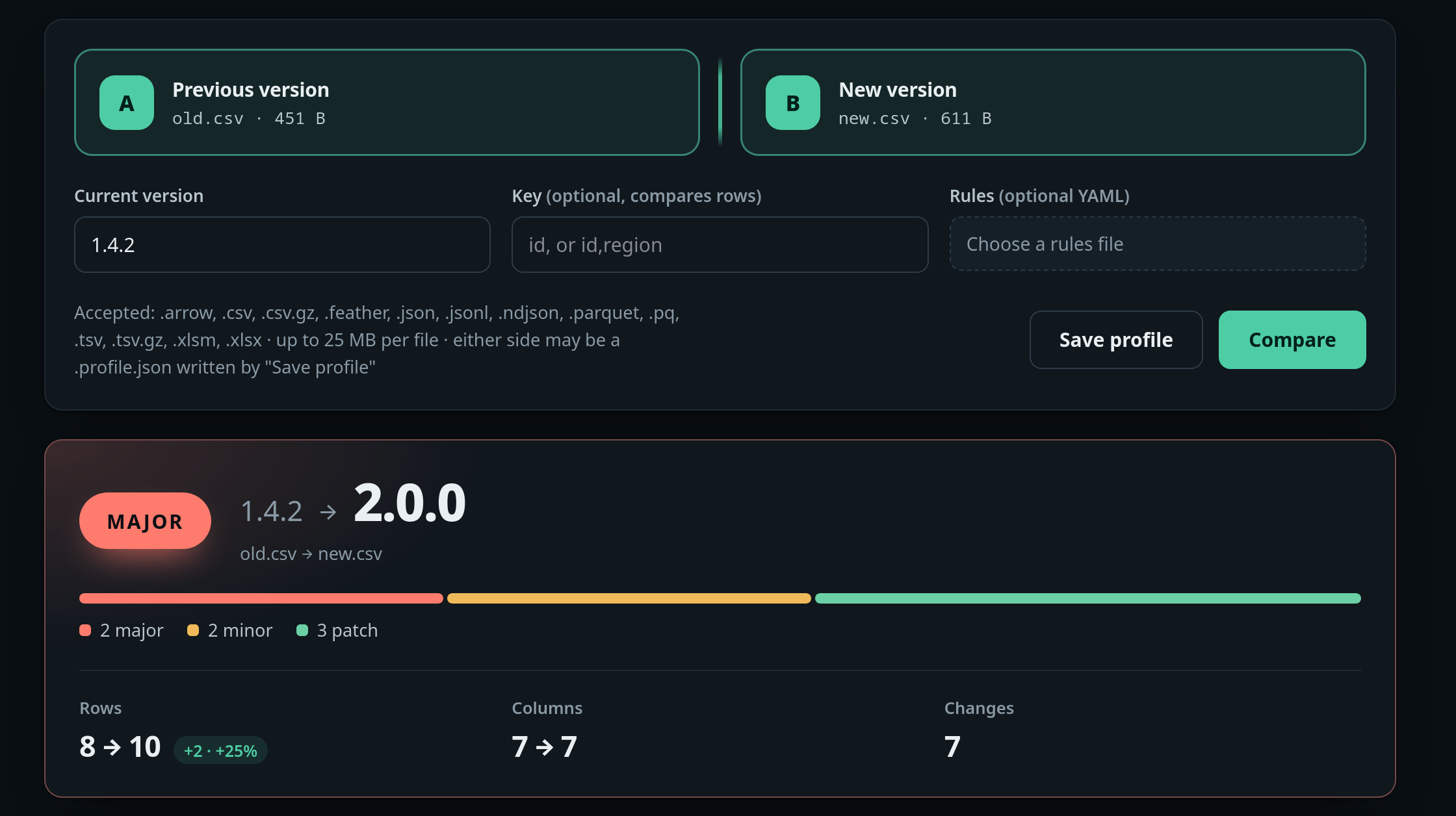
Upload two files, or pick two versions from a directory it watches.
It compares distributions, not just schemas
A mean is one point of a distribution, and a column can be rebuilt around it without
moving it. Three changes that break every consumer downstream, and that a comparison of
schemas and averages reports as nothing at all:
A shape, not a centre
The spread grows fortyfold and the mean does not move. Measured with a Kolmogorov-Smirnov statistic over a stored quantile grid.
std 0.998 → 39.96
A balance, not a set
A label goes from even to one-in-a-hundred with both values still present, so the category set is unchanged. Measured with the Population Stability Index.
'ok' 50.3% → 99.0%
A window in time
A date column is compared on when it actually sits, so an export that slid forward or now covers half the period is a change rather than a silence.
2020-01-01 → 2026-01-01
Both are weighed against what the sample can support. A KS statistic has no fixed
reading: on four rows against five, appending a single row moves the distribution by a
fifth, so a shift has to clear the critical value for those sample sizes as well as the
configured threshold. On a handful of rows nothing is reported, because there is nothing
to report. And with a --key, rows are matched rather than summarised: a
version where a third of them were rewritten with values drawn the same way has the same
profile as the one before it, and is a different dataset to anyone joining against it.
Profile a file larger than memory
The default engine loads the dataset into a dataframe, which is the fastest thing to do
until the dataset stops fitting. --engine duckdb aggregates over the file
instead, and duckdb-sketch estimates the quantile grid rather than computing
it — the one number that costs a full pass.
Measured on 16 million rows and seven columns, at peak resident memory of the process.
The sketch is a named engine rather than an automatic shortcut, because it stops
interpolating between values on small inputs: on eight rows it answers 1 where the other
path answers 1.35, so it diverges most exactly where the result is easiest to check by
hand. Set DATASEMVER_DUCKDB_MEMORY_LIMIT and the ceiling is yours; what does
not fit spills to disk instead of failing.
# half the memory, same answers
datasemver diff old.parquet new.parquet --engine duckdb

# a third again, with the quantile grid estimated
datasemver profile huge.csv --engine duckdb-sketch
The profile outlives the data
A comparison reads a profile: the columns, their types, their null ratios, a quantile
grid and the counts per category. It is small enough to commit beside the dataset, and
then the previous version never has to be fetched — or exist.
- Dataset
- 63.6 MB
- Its profile
- 2.9 KB
- Ratio
- 21,916:1
# write it once, next to the data
datasemver profile customers_v3.parquet

# compare against it later, with the file long gone
datasemver diff customers_v3.profile.json customers_v4.parquet

# from the Parquet footer: a seek instead of a scan
datasemver profile customers_v3.parquet --schema-only
A Parquet footer already holds the schema and, per column, the nulls and the smallest and
largest value — every input a schema-level comparison reads. What it cannot give is
the quantile grid and the category counts, so a profile written from it records that it
came from there, and any comparison against it says no distribution was checked. Without
that, the report would read exactly like one where nothing moved.
Seven ways in, one report
Command line
Built on typer and rich. Add --json when a script needs to read the answer instead of a person.
datasemver diff old.csv new.csv
Database tables
A connection URL with the table after #. SQLite needs no driver; PostgreSQL and MySQL use the sql extra.
sqlite:///snapshots.db#customers
Python library
Two paths, or two profiles you already hold in memory when the data came from a warehouse query.
from datasemver import analyze
Web dashboard
A local tool with no authentication and no rate limiting. Keep it on the loopback interface.
pip install "datasemver[web]"
GitHub Action
Analyses the datasets a pull request touches and posts the suggested bump, rewriting the same comment on each push. Set a threshold and it refuses the merge — after commenting, so the refusal arrives with its reason.
uses: IzanVil/datasemver@v0.8.2
DVC
Compares the datasets DVC reports as changed between two revisions, continuing each from the version recorded beside it rather than restarting at zero.
datasemver dvc --rev HEAD~1
Standalone binary
One executable per platform that brings its own Python, for machines where installing one is not an option. Database and workbook support are built in.
linux · windows · macos arm64 & x86_64
# read the bump from a release script
BUMP=$(datasemver diff old.csv new.csv --json | jq -r '.bump')

# prepend the changelog entry to a file you keep
datasemver diff old.csv new.csv --current-version "$(cat VERSION)" --output CHANGELOG.md

# refuse a breaking change: 0 ran clean, 1 was refused, 2 could not run
datasemver diff old.csv new.csv --fail-on major

# which rows changed, not only whether the shape did
datasemver diff old.csv new.csv --key id

# record the version it computed, instead of retyping it
datasemver diff old.csv new.csv --current-version 1.4.2 --write-version
Install it
Python 3.10 or newer, typed, no runtime network access. Releases are published from CI
through Trusted Publishing with signed provenance, so no long-lived token exists. Extras
are opt-in: sql for databases, excel for workbooks,
duckdb for the engines, web for the dashboard.
No Python on the machine? Every release also carries a single executable per platform
that brings its own, with database and workbook support built in —
on the latest release.